Debt Collection System Integration
This guide describes how an external debt collection system can integrate with ITX to support outbound calling campaigns, case popup for inbound and outbound calls, call status and AI summary syncing, and a self-service Interactive voice response (IVR) and SMS flow for debtors.
Before using the integration, a few things need to be set up in ITX — see Prerequisites. The integration itself consists of four building blocks:
- Calltasks — importing and ending call tasks
- Popup in debt collection system — showing the debtor's case when a call is placed or received
- Call status and AI summary sync — keeping call outcomes and AI-generated summaries in sync with your case
- Self service — letting debtors call in, identify themselves, and receive an automated status update on their debt collection case. They can settle the outstanding claim without speaking to an agent—either by receiving an SMS with a payment link, KID number, bank account number and amount, or by paying directly with Vipps. If further assistance is needed, smart routing automatically connects the caller to the right team based on the case information.
Prerequisites
A few things need to be set up in ITX before call tasks can be imported.
External systems
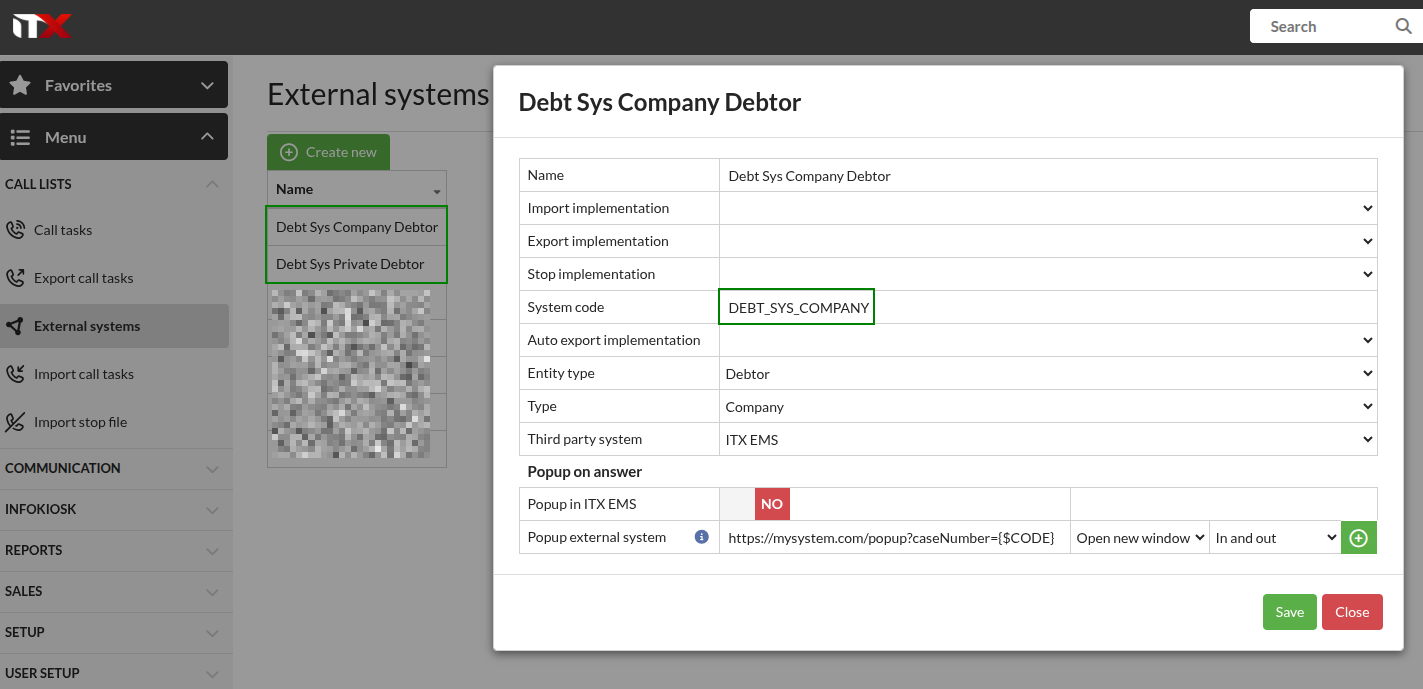
One or several external systems need to be set up in ITX via Call Lists > External systems. For example, you can set up one system for private debtors and another for company debtors. This is also where the popup URL for opening a case in your system is configured.
Campaigns
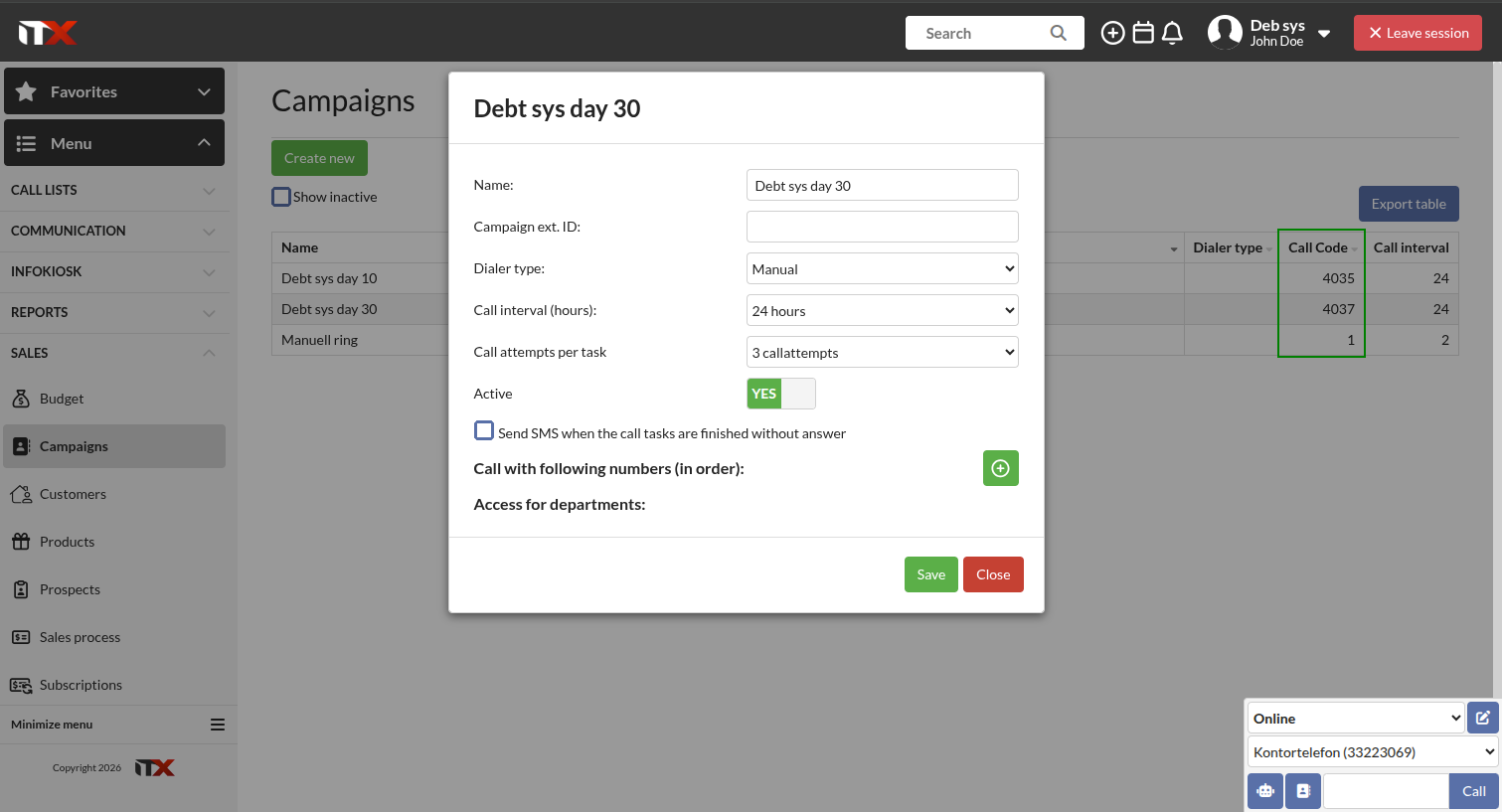
One or several campaigns need to be set up in ITX via the API or in the GUI via Sales > Campaigns:
API endpoint to create campaigns:
POST /dialer/callcode
API endpoint to retrieve campaigns:
GET /dialer/callcode
Calltasks
Calltasks drive the outbound dialing campaigns run by ITX on behalf of the debt collection system.
Importing calltasks
Calltasks are imported using:
POST /itxdialer/calltaskimport
A few things to keep in mind for a debt collection setup:
systemCodedifferentiates between debtor types, and must match the system code of one of the external systems set up in ITX. ITX can have one system configured for private debtors and a separate system configured for company debtors.callCodeidentifies the campaign the call tasks should be added to. Different campaigns are configured in ITX, and this parameter routes imported call tasks to the correct one.- Each call task object in
callTasks[*]needs to includesystemLookupCode, which is the debtor's case number, andextCustId, a unique ID for the debtor in the debt collection system, in addition to the debtor's name and phone number.
Full documentation for this endpoint, including the request/response schema and error codes, is available in the Calltasks guide.
Ending calltasks
Call tasks are ended using:
PUT /v1/calltasks/{itcaId}/end
Who ends a calltask, and when:
| Scenario | Ended by |
|---|---|
| Debtor has paid and the call task in ITX is still active | Debt collection system (explicit call to end the calltask) |
| Debtor has answered the call | ITX (automatically) |
maxCallAttempts has been reached | ITX (automatically) |
In other words, the debt collection system only needs to actively end a calltask when it detects that the debt has been paid and the calltask in ITX is still active — ITX handles the other end conditions automatically.
Retrieving the itcaId
To end a calltask, you first need its itcaId. Retrieve the calltask object using:
POST /dialer/calltaskget
Search by the case number that was originally imported into ITX (the systemLookupCode) for active (unfinished) call tasks:
{
  "systemLookupCodes": ["{case number imported to ITX}"],
  "finishedList": [false]
}
The response contains the itcaId, which is then used in the PUT /v1/calltasks/{itcaId}/end call.
The response is a list, so a search on systemLookupCode can match more than one call task — for example if the same case has been imported into more than one campaign. If that happens, add another filter field (such as callCodes) to narrow the result down to a single call task if needed. See the POST /dialer/calltaskget reference at the end of this guide for the full set of available filter fields.
Popup in debt collection system
To show a debtor's case automatically when a related call happens, the debt collection system needs an endpoint that can handle a popup URL containing the case number, for example:
https://mysystem.com/popup?caseNumber={$CODE}
{$CODE} is replaced by ITX with the relevant case number / systemLookupCode. This URL is set on the external system configured in ITX.
It's also possible to have the caller's phone number as an argument. This might be handy if the caller enters the wrong case number and you want to display a popup with all the cases for that phone number.
This popup URL is triggered by ITX in the following situations:
- An agent calls out on a calltask that was imported for this system.
- A debtor calls in and the incoming call is matched to a calltask by phone number.
- A debtor calls in without any calltask match, and manually enters their
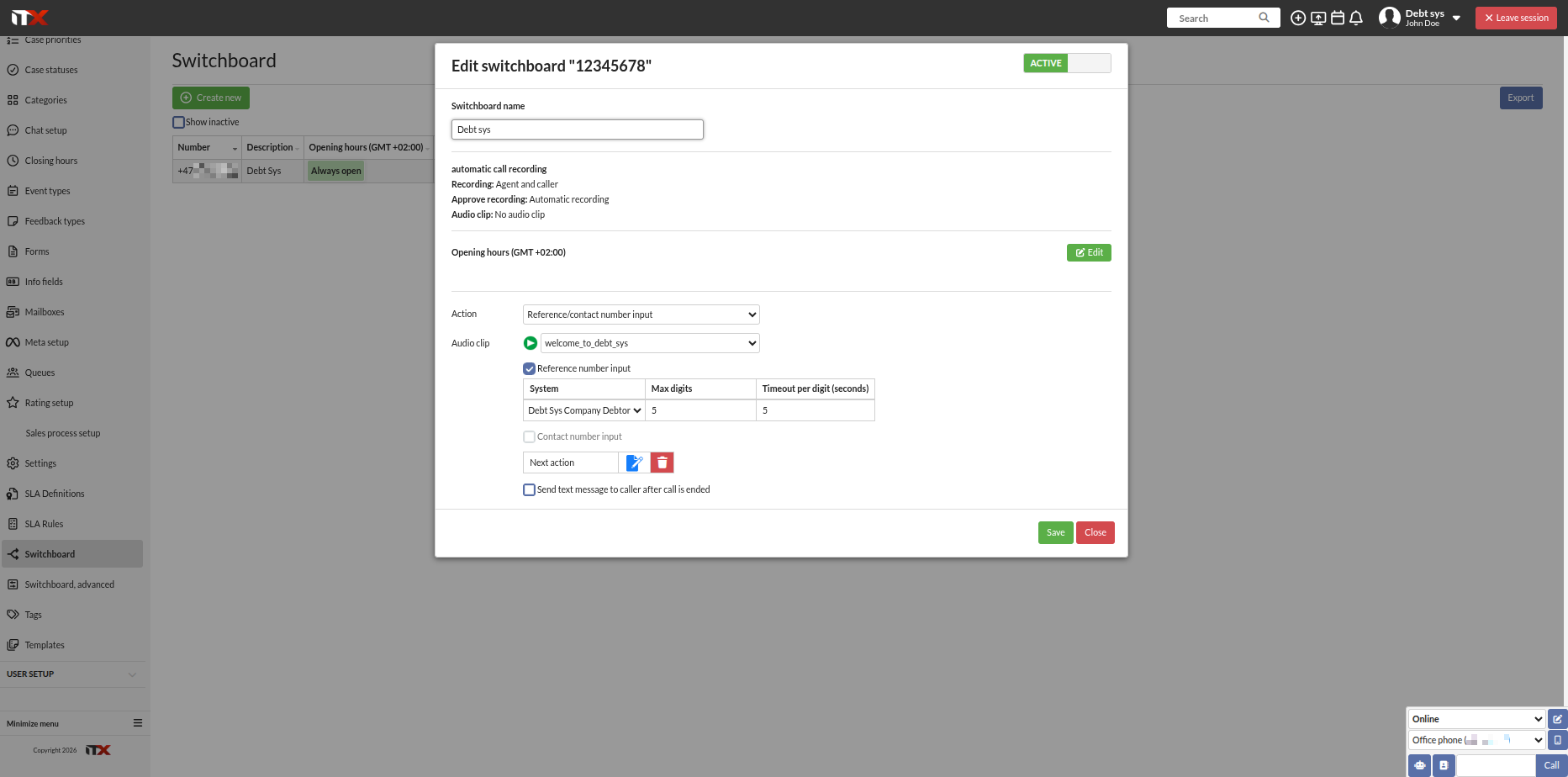
systemLookupCode(case number) using the keypad. (Configured in the ITX switchboard.)
Call status and AI summary sync
To keep call status and AI-generated call summaries in sync with a case in the debt collection system, do the following:
1. Subscribe to webhooks
Subscribe to the following webhook events:
phone-call.endedphone-call-summary.creationphone-call-summary.update
See the Webhooks guide for details on setting up and consuming ITX webhooks.
2. Look up the call
Use the phoneCallId from the webhook event as the value of the eactIds property when calling:
POST /itxems/calls/search
JSON payload:
{
  "eactIds": ["{phoneCallId}"]
}
The phone-call.ended webhook fires for every call handled by ITX, not just calls related to debt collection, so check that the returned call actually belongs to your integration before processing it further. Do this by comparing externalSystem.itsyId in the response against the itsyId of one of the external systems set up for the debt collection integration — if it doesn't match, ignore the call. The case number (systemLookupCode) — whether taken from the matched call task or entered by the caller on the keypad — is also available directly on the response, in the systemLookupCode property.
3. Determine whether the call was answered
- If
startTsexists in the payload and has a timestamp value, i.e. is not null, the call was answered.
4. Determine detailed call status
How you determine the more detailed call status depends on whether the call is linked to a calltask:
-
Call is linked to a calltask (the response from
POST /itxems/calls/searchincludescallAttempt.iccaId): Use theiccaIdto search:POST /itxdialer/calltaskcallattempts/searchThis lets you determine whether the call went to voicemail, was dropped, or was lost.
-
Call is not linked to a calltask (i.e. the debtor is not known in ITX): Simply use whether
startTsexists and has a timestamp value to determine call status.
5. Retrieve the AI summary
A phone-call-summary.creation event is sent out once the AI summary is ready, usually shortly after the call ends — but this can take longer, or fail. A phone-call-summary.update event is sent out each time the summary is updated (might be manually changed by an agent). Repeat the step 2 lookup using the phoneCallId from the event, and apply the same check described there, before processing the summary.
For details on retrieving the AI summary, see the Phone calls guide.
The phoneCallSummaryId sent in the phone call summary webhook events corresponds with the call activity's eactId.
Self service
Letting debtors call in, identify themselves, and receive an automated status update on their debt collection case. They can settle the outstanding claim without speaking to an agent—either by receiving an SMS with a payment link, KID number, bank account number and amount, or by paying directly with Vipps. If further assistance is needed, smart routing automatically connects the caller to the right team based on the case information.
1. Expose a case/payment lookup endpoint
Provide an endpoint that returns case and payment information for a given debtor case, for example:
GET https://mysystem.com/CaseInfo/{caseNumber}
It's also possible to have the caller's phone number as an argument as well if needed, but it's expected that the case number (systemLookupCode in ITX) is enough.
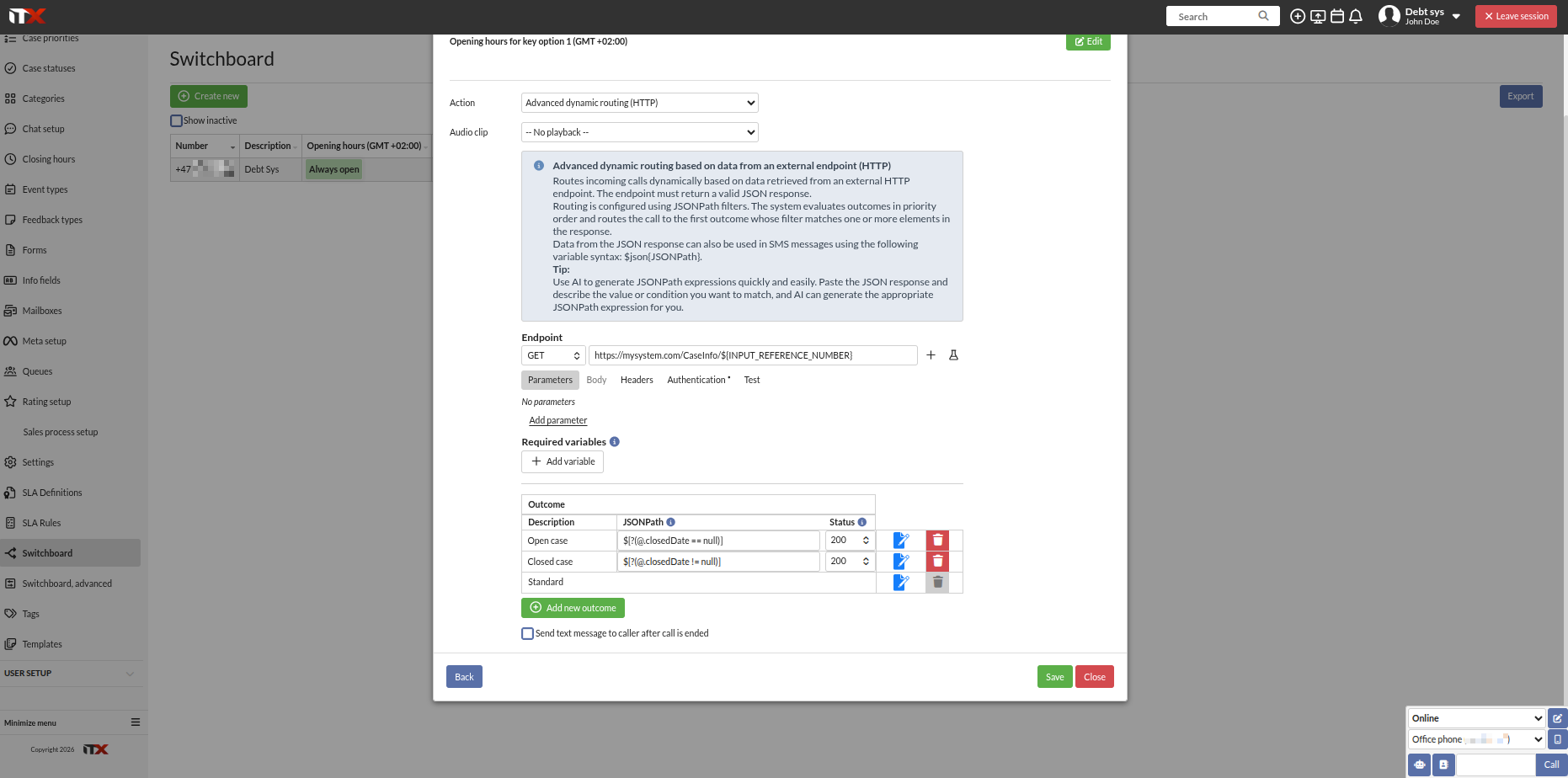
This is then configured in the ITX Switchboard, where different outcomes can be set up using JSONPath and conditional logic. Property names and values in the response are flexible and can be tailored to your system.
Example response:
{
  "paymentAccount": "24800000001",
  "paymentReference": "5900000000123596",
  "paymentUrl": "https://paymentprovider/123",
  "remainingAmount": 29370.52,
  "closedDate": null,
  "caseNumber": 123,
  "caseCategory": "Standard",
  "caseHandlerName": "John Doe"
}
2. Configure JSONPath conditions in the Switchboard
Use JSONPath expressions against the response above to branch the self-service flow:
| Condition | Meaning | Action |
|---|---|---|
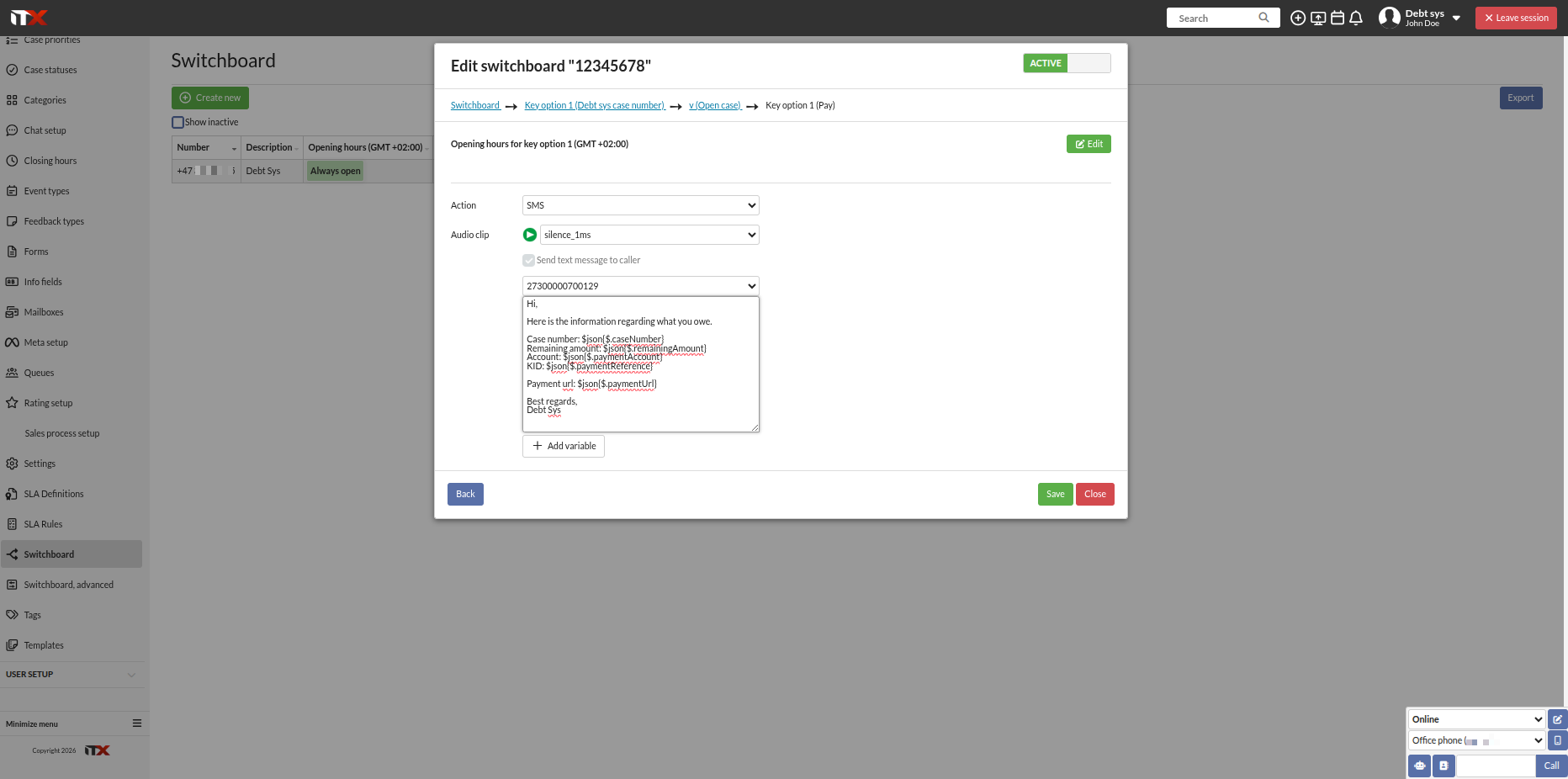
$[?(@.closedDate == null)] | Case is open | Send an SMS with payment information (payment URL, amount, reference, etc. can be dynamically inserted using JSONPath) |
$[?(@.closedDate != null)] | Case is closed | Play a voice recording informing the caller that the case is closed |
Any field from the response can be referenced via JSONPath to personalize the SMS content or voice prompt.
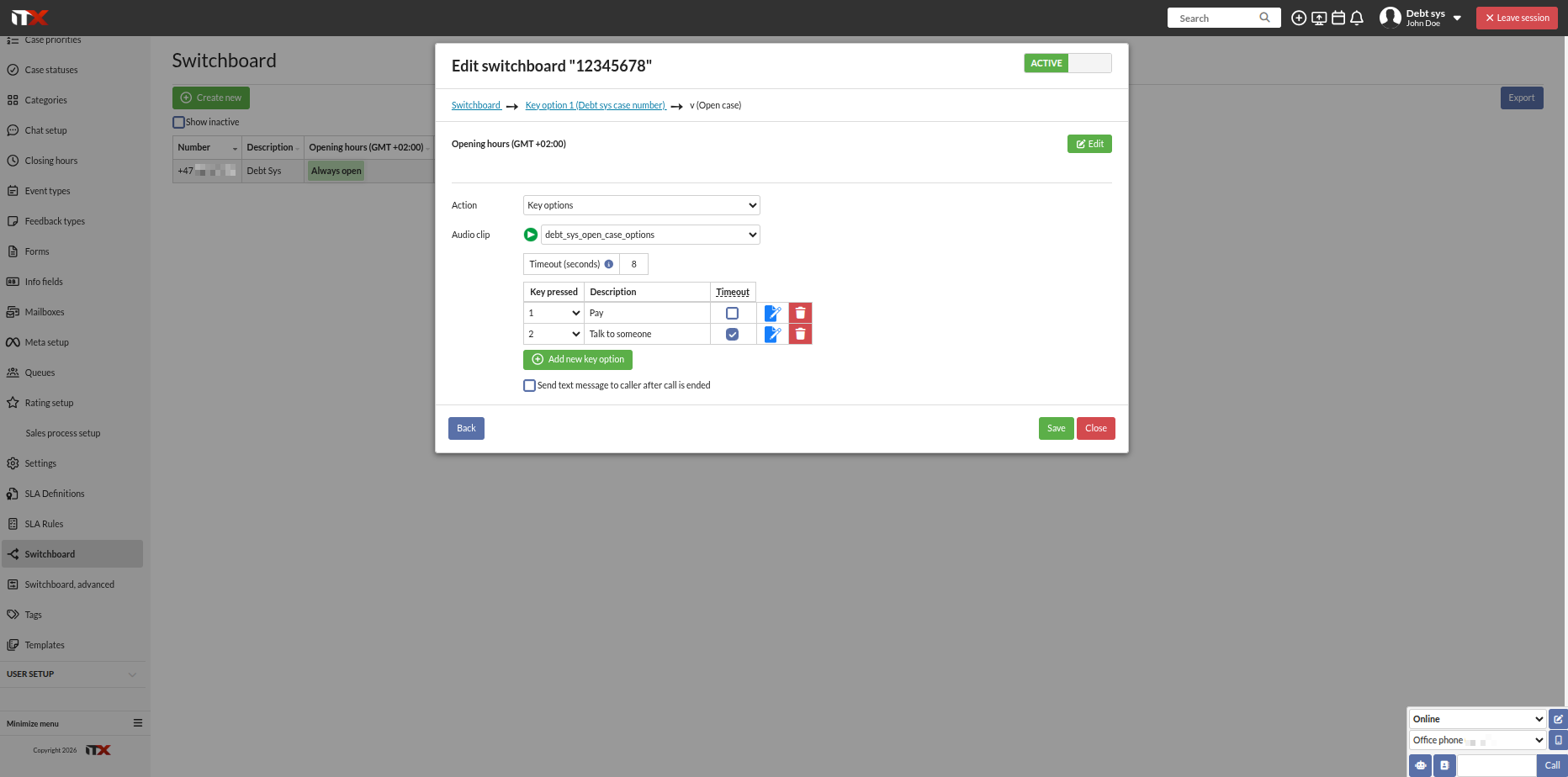
Example switchboard configuration
Reference number (case number) entered via keypad connected to the external system:
Advanced dynamic routing based on the case number:
Open case options:
SMS with values from the case info response:
Appendix: POST /dialer/calltaskget reference
This endpoint predates the OpenAPI/Swagger documentation and isn't listed there, so it's documented here for reference.
Request
POST /dialer/calltaskget
The request body is a single JSON object combining search filter fields with pagination and sorting options. All fields are optional — combine whichever ones you need to narrow the search.
Filter fields (most relevant for an external integration):
| Field | Type | Description |
|---|---|---|
systemLookupCodes | string[] | Case numbers imported into ITX. Used to look up the call task(s) for a specific case. |
extCustIds | string[] | Debtor IDs from the debt collection system. |
itcaIds | number[] | ITX call task IDs, if already known. |
callCodes | object[] | Filter by one or more campaigns (call codes). |
statusList | number[] | Filter by internal call task status code(s). |
answeredList | boolean[] | Filter by whether the call task has been answered. |
finishedList | boolean[] | Filter by whether the call task is finished. |
callNumbers | string[] | Filter by the phone number(s) dialed. |
hasCallBackDate | boolean | Filter by whether a callback date is set on the call task. |
The full filter object supports additional ITX-internal fields (corporation, assigned user, date ranges, activity feedback types, and so on), but these require internal ITX identifiers and aren't typically relevant for an external debt collection system.
Pagination and sorting fields:
| Field | Type | Default | Description |
|---|---|---|---|
limit | number | 50 | Maximum rows to return per page. Values ≤ 0 are treated as 1000; values above 50000 are capped at 50000. |
pageNumber | number | 1 | Page of results to return. |
sort | string | – | Column to sort the results by. |
detail | boolean | false | Return full call task details rather than a summary. |
Response
{
  "callTasks": [ /* array of call task objects, including itcaId */ ],
  "foundRows": 1,
  "firstRow": 1,
  "lastRow": 1,
  "pageCount": 1
}
callTasks— the matching call task objects for the current page. Each includes theitcaIdneeded to end a calltask.foundRows— total number of matching call tasks across all pages.firstRow/lastRow— the row range returned on this page.pageCount— total number of pages available at the givenlimit.